|
|
Review of media centre Sony Ericsson MMV-200
Sales package:
- Media centre
- CST-13 charger
- RCA/SCART adapter
- User Guide
We have spoken much about Sony Ericsson’s prowess in the field of Bluetooth-accessories development – reviews on some gadgets, including headsets have kept on popping up on our portal. However there is another type of devices, which media centers belong to in particular– these are mediums allowing for wireless communication between a handset and a TV set or home stereo. The article devoted to SE MMV-100 has long since been on our site, today we are getting to know closer its successor – the MMV-200. Though this time, it is no ordinary review – we would rather call it a “look-see” of its major features and conclusion on its viability on the market (or, frankly speaking, this type of gadgets on the whole).
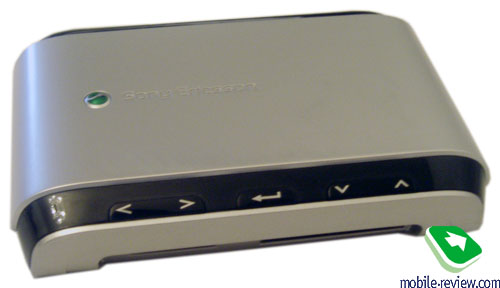
Like we have already mentioned it in one of the podcasts, we are getting to think that some accessories by Nokia and Sony Ericsson are destined to fill up the room surrounding owners of handsets by one of these brands, and it is no surprise, since the companies are willing to leave a “trace” nearly everywhere – in car, on workplace, in bedroom or living room. The MMV-200 is that “trace” of the company for your living room or any other place where you have the biggest TV set in the house placed at. On the whole, the gadget’s design will fit a living room in a convenient fashion – your interior will get another stylish-looking “high-tech-thing”, the gadget lovers will surely appreciate that. Although, the media centre’s father is other than being placed in a place where no one would ever see it and forgotten, used for quite file transfers. The paradise promised by the manufacturer is a gimmick, or, better to say, it goes a slightly different way, thus you won’t be able to gather friends around, get a good spot on your favorite sofa and browse pictures stored on the handset as if by magic.
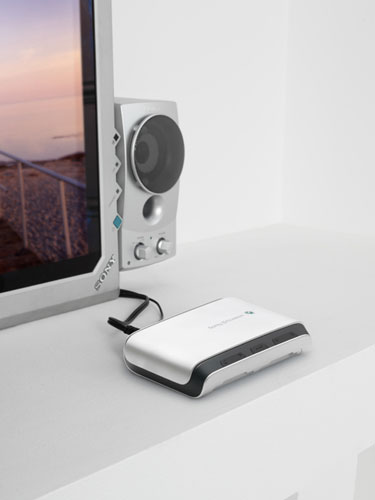
The reason is the following – the MMV-200 can be connected to a TV-set only via an RCA cable or with the help of RCA/SCART adapter, and don’t forget reserving one plug socket for this gadget, it is a power-hungry device. To link up the MMV-200 with a monitor, you will need a free VGA-slot on it (which holds true for some TVs as well). To cut a long story short, I connected the device via the cable taken from my DVD-player and everything worked just fine – I’m really not good at the terms, but it probably was RCA, as I didn’t use any adapters.
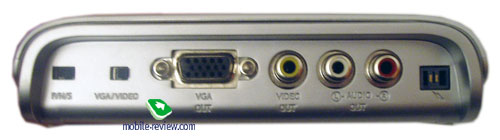
After that, you will need to switch to AV channel on the TV, but primarily the toggle switches on the back panel should be checked – one of them handles video standards PAL/NTS/SECAM, the other one – VGA and Video modes. The MMV-200 itself comes to life after pushing the Enter button on the front plate. Then you are free to get your phone work together with the MMV-200 by activating Bluetooth on it and looking at the menu displayed on the TV, as pairing starts right there. The access code is generated by the MMV-200. Generally speaking, all those unfamiliar with basic “how-to” regarding Bluetooth connection, should look for guidance in the manual, otherwise problems are inevitable (at least I had a couple of issues). The device was tested out in a pair with Nokia N80. Once you have paired up the handset and the media centre, it becomes possible to browse photos stored on the handset, the following formats and resolutions are supported: Baseline JPEG (5120x3840 pixels), Progressive JPEG (2048x1536 pixels), BMP (the same as for progressive JPEG), GIF (the same as for progressive JPEG; support for animated JPEG is missing).
The photos browsed on the N80 were taken in JPEG format at a resolution of 2048х1536 pixels, measuring about 1,5 Mb in size. To view a snap on TV, you need to pick a photo on the handset and then transfer it to the MMV-200, which takes quite a while – about 30-40 seconds. As the manual puts it, the transfer rate may be affected by other activated Bluetooth-devices – I had a couple of them running back then, however I seriously doubt the speed would have increased if I had disabled such harmless things as a headset and notebook’s adapter. However I must admit I’m tricking you – I actually did turn off all the gadgets nearby, though the speed remained the same long 30-40 seconds, which is really slow.
Once a photo has been transferred, it appears on TV, however the quality has still some room for improvement. Maybe some other camera-phone would do better; and one more thing of note – snaps were viewed on a CRT-powered TV, rather than LCD, so it might prove to be another reason why, even though I have doubts about that.
Nevertheless, to browse photos you can pick another way – the MMV-200 incorporates a card-reader supporting MMC, SD, Memory Stick, Memory Stick Duo, CF, SM formats, in other words you can upload photos from almost any type of memory cards, but what is really going to be a hassle is restrictions on resolutions and missing support for TIFF. On top of that, owners of digital cameras are unlikely to turn to the MMV-200, since they can seamlessly connect it to the TV-set using a bundled data cable. Personally, I wouldn’t even think of making use of such “adapter”, which handles “serious” files in a strange fashion – linking up a camera directly to TV makes more sense.
At any rate, the media centre easily recognized the memory card taken from the handset and stored its video, audio and photo contents in own virtual folders, viewable on the TV’s screen. As for audio and video files, as the manufacturer claims, the following formats are supported:
Music on the memory card:
- MP3: 32 kbit/s ~ 320 kbit/s (on high bitrates interruptions and lags might be experience)
- WAV: uncompressed PCM and MS ADPCM
- AMR: formatsAdaptive Multi-Rate range from 4,75 kbit/s to 12,2 kbit/s
- AAC: bitrate of MPEG4 AAC High Efficient profile 64 kbit/s ~ 384 kbit/s
Video on the memory card:
- MPEG1: standard resolution up to CIF (320x288), SIF (320x240), 30 frames per second
- MPEG4: profiles Simple Profile and Advanced Simple Profile up to Full D1 (PAL: 704x576, 720x576, NTSC: 704x480, 720x480), 30 frames per second. No support for GMC and QPEL
- H.263: up to 4CIF (704x576), 30 frames per second
You can watch video as well, but again, the quality leaves much to be desired, or listen to some music on your home stereo. Though, it’s not clear – what for? The concept is seemingly too complicated – video clips captured by a handset frequently look good only on the phone’s screen. Now imagine what mess is going to appear on your TV’s display – pixelization is not the proper words here, really. As for music, it usually makes its way to you handset via PC, so what is the point in using a “medium” like the MMV-200 for listening? But at the end of the day, it’s up to you to decide whether you need such accessory or not.
By the way, the media centre can be managed remotely – to do that, you will need to copy a Java-application from the MMV-200’s internal memory and install it on your handset, however the N80 didn’t get along with it too well.
All in all, my personal conclusion is simple: the MMV-200 would be really a credible medium for viewing photo-content on TV, if only it had slightly higher transfer rate, as it would outweigh the somewhat mediocre quality. The rest of functionality, in my opinion, won’t be called for at all by many – if it isn’t so, please write me a letter on how you use your MMV-200. Moreover, the device is a rare guest in retail stores and costs about 100-110 USD, which is way too much (by the way, the MMV-200 will look really good as a present). If what the company’s representatives say is true, we are about to see another media centre boasting support for A2DP, which might turn out to be quite fetching, yet only a toy for lovers.

Sergey Kuzmin (skuzmin@mobile-review.com)
Translated by Oleg Kononosov (oleg.kononosov@mobile-review.com)
Published — 28 November 2006
Have something to add?! Write us... eldar@mobile-review.com
|
News:
[ 31-07 16:21 ]Sir Jony Ive: Apple Isn't In It For The Money
[ 31-07 13:34 ]Video: Nokia Designer Interviews
[ 31-07 13:10 ]RIM To Layoff 3,000 More Employees
[ 30-07 20:59 ]Video: iPhone 5 Housing Shown Off
[ 30-07 19:12 ]Android Fortunes Decline In U.S.
[ 25-07 16:18 ]Why Apple Is Suing Samsung?
[ 25-07 15:53 ]A Few Choice Quotes About Apple ... By Samsung
[ 23-07 20:25 ]Russian iOS Hacker Calls It A Day
[ 23-07 17:40 ]Video: It's Still Not Out, But Galaxy Note 10.1 Gets An Ad
[ 19-07 19:10 ]Another Loss For Nokia: $1 Billion Down In Q2
[ 19-07 17:22 ]British Judge Orders Apple To Run Ads Saying Samsung Did Not Copy Them
[ 19-07 16:57 ]iPhone 5 To Feature Nano-SIM Cards
[ 18-07 14:20 ]What The iPad Could Have Looked Like ...
[ 18-07 13:25 ]App Store Hack Is Still Going Strong Despite Apple's Best Efforts
[ 13-07 12:34 ]Infographic: The (Hypothetical) Sale Of RIM
[ 13-07 11:10 ]Video: iPhone Hacker Makes In-App Purchases Free
[ 12-07 19:50 ]iPhone 5 Images Leak Again
[ 12-07 17:51 ]Android Takes 50%+ Of U.S. And Europe
[ 11-07 16:02 ]Apple Involved In 60% Of Patent Suits
[ 11-07 13:14 ]Video: Kindle Fire Gets A Jelly Bean
Subscribe
|

 Samsung Galaxy Note. First Look
